Browser placement and protection
Browser workers are tabs whose worker identity is tracked by the browser runtime and reported as part of client state. Worker windows provide a place to create and prefer those tabs. The two identities are related but not interchangeable: worker ownership belongs to the tab for its lifetime, while window ownership is a placement hint.
Moving a worker tab between windows does not demote it, and moving an ordinary tab into a worker window does not promote it. Users and Chrome can still move or close resources, so application code must treat placement as current evidence rather than a permanent physical boundary.
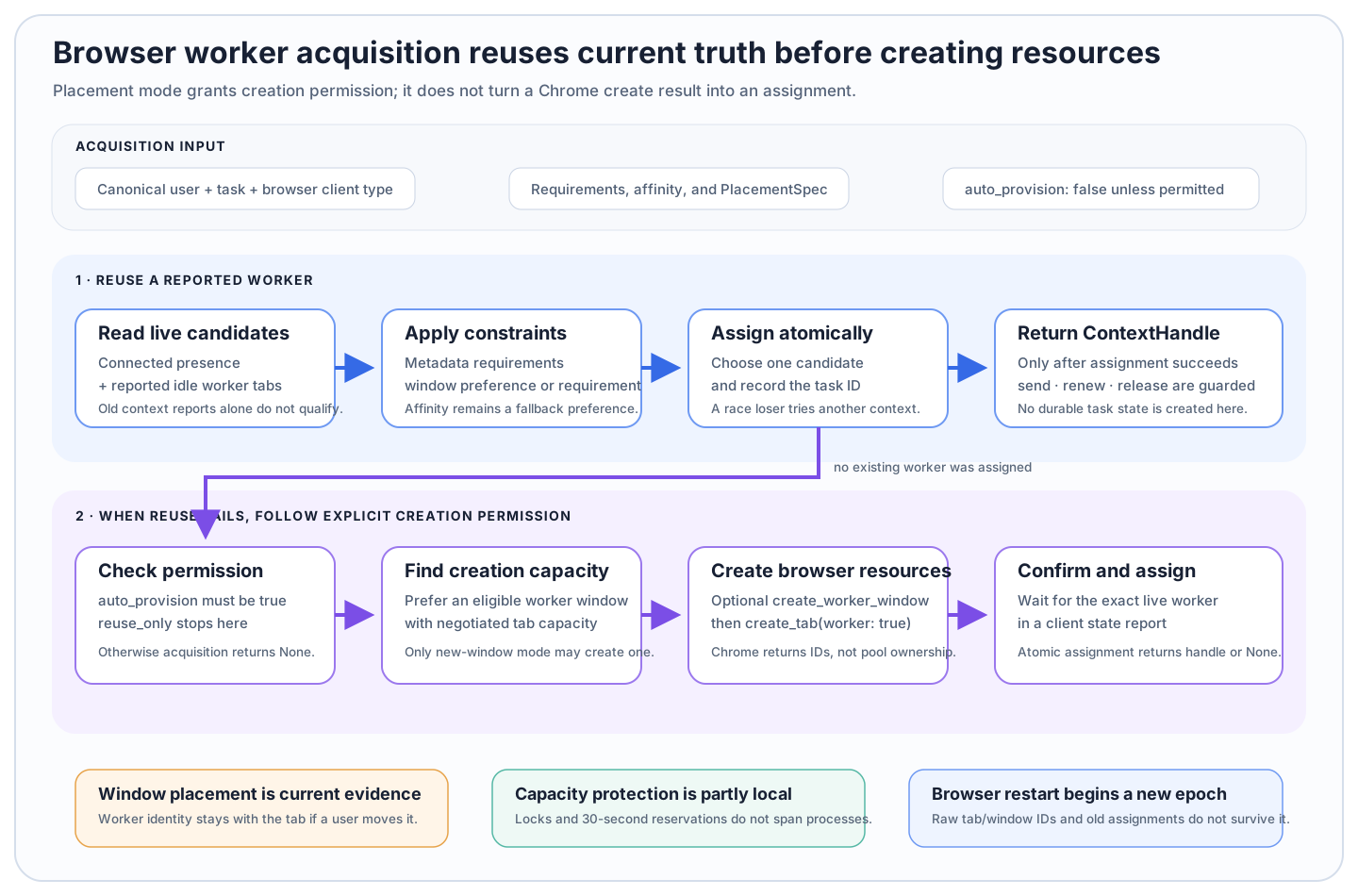
A successful Chrome create command is not yet a pool assignment. The exact worker context must appear in a state report and win atomic assignment first.
Placement controls how far acquisition may go
PlacementSpec has three creation modes:
| Mode | Existing worker | New tab | New window |
|---|---|---|---|
reuse_only | allowed | not allowed | not allowed |
reuse_or_new_tab | allowed | allowed inside an eligible worker window | not allowed |
reuse_or_new_window | allowed | allowed | allowed when no eligible window has capacity |
The default is reuse_only. Creation also requires auto_provision=True, an AppNode, and the relevant registries. Supplying a permissive placement mode without auto-provisioning does not create anything.
from servercheetah.services import PlacementSpec
from servercheetah.types.contexts import ClientType

handle = await wcm.acquire(
    user_id=user_id,
    task_id=task_id,
    client_type=ClientType.browser,
    auto_provision=True,
    placement=PlacementSpec(
        mode="reuse_or_new_window",
        window_affinity="least_loaded_window",
    ),
)
Placement is browser-only. A placement supplied with a non-browser client type produces no assignment rather than being ignored.
Preferred and required windows mean different things
window_id with window_match="preferred" ranks that reported window first but permits a fallback worker. window_match="required" needs a window ID and admits only a worker currently reported in that exact assignable window. Required placement never creates a different window.
any_worker_window uses deterministic preference among reported eligible windows. least_loaded_window considers current busy-worker and worker-tab counts after explicit window and client affinity preferences. These values are snapshots, not a global queue-depth metric.
Browser window IDs are local to a browser client and are not durable across a full browser restart. Use client requirements to narrow eligible clients when the physical browser matters; do not persist a Chrome window ID as a long-lived product address.
An assignable reported window is worker-owned, open, normal, non-incognito, and not draining. Without IBrowserWindowRegistry, the manager cannot evaluate those conditions or place a new browser worker.
Creation is confirmed through reported truth
When a suitable worker window has tab capacity, WCM sends create_tab with worker: true, active: false, and about:blank. If a new window is permitted and required, it first sends create_worker_window, then creates the worker tab inside it.
The command result supplies local IDs, but the manager polls the context registry for about three seconds. It assigns only when that exact context appears as a live, idle worker in the expected client and window. A late or missing report returns None. A resource may have been created even though acquisition failed, so operational cleanup and later reconciliation must not assume None means Chrome stayed unchanged.
If worker-tab creation fails after a new worker window was created, the window remains available for later reuse. The browser-created window can also retain Chrome's initial placeholder tab.
Capacity is negotiated at both ends
Default worker limits are:
{
  "max_windows": 1,
  "max_tabs_per_window": 5,
  "max_tabs_total": 5,
  "max_flows": 5
}
The hello handshake computes effective_worker_limits from the client configuration and server policy. Server policy may lower a client limit but does not raise it. The browser handlers enforce their current local limits when creating or marking windows and tabs. WCM reads the negotiated effective limits from connection metadata and combines reported counts with short-lived local reservations while it waits for new state reports.
The per-user creation lock and 30-second reservations protect ordinary concurrency inside one manager process. They are not distributed locks. Several AppNode processes can still create against the same old snapshot; choose one browser provisioning owner per user/client in a horizontally scaled deployment. Other processes can acquire already reported workers with reuse_only.
max_flows belongs to the shared limit object but WCM does not currently enforce it for console auto-provisioning.
Browser ownership survives service-worker replacement
The browser stores worker-tab and worker-window IDs in chrome.storage.session. MV3 service worker replacement rehydrates IDs that still identify open resources. A full Chrome restart starts a new browser session and context epoch, so raw tab/window IDs and prior task assignments do not carry across it.
Worker-tab registration is not considered complete until session storage succeeds. If registration fails, the create handler removes partial ownership and attempts to close every tab created by that command. Failure details report cleanup errors rather than pretending rollback was complete.
The overlay is a usability safeguard
The browser runtime applies a default worker overlay on tracked worker tabs on startup, registration, and navigation when the content script is reachable. set_worker_overlay can show, update, or hide it and can carry a message and progress value. A ContextHandle supplies the tab target automatically.
The overlay blocks ordinary page-level pointer, scrolling, touch, and keyboard interaction. It is not a security boundary: browser chrome shortcuts, extension disablement, developer tools, tab closure, restricted pages, and unreachable content scripts remain outside its control. During supported screenshot capture the overlay becomes transparent while its blockers remain active, then restores its visual state.
An application may customize or hide the overlay, but releasing a WCM assignment does not automatically remove it. Treat overlay cleanup and task release as separate best-effort steps.
Continue with Lifecycle and deployment for process ownership, timeouts, disconnect cleanup, and shared-registry rules.